 Flawless Schema
Recipe Schema Guide 2026: Boost Your Food Blog's SEO with Structured Data
Everything food bloggers and chefs need to know about recipe schema markup — from required properties and Google's guidelines to WordPress implementation and free JSON-LD generation.
- What Is Recipe Schema?
- Why Recipe Schema Matters for SEO
- What You Lose Without Recipe Schema
- Required Properties — What Google Needs
- Recommended Properties — What Gets You Rich Results
- Complete Recipe Schema Example
- How to Add Recipe Schema to a Food Blog
- How to Implement Recipe Schema on WordPress
- Generate Recipe Schema Free — No Coding Needed
- How to Validate Your Recipe Schema
- Conclusion
What Is Recipe Schema?
Recipe schema is a type of structured data defined by schema.org that communicates everything about a recipe — its ingredients, cooking time, nutrition facts, ratings, and step-by-step instructions — directly to search engines in a machine-readable format. Instead of leaving Google to guess what your recipe page contains, recipe schema explicitly declares it: this is a recipe, here is who created it, here is how long it takes, here is what goes in it, and here is what it's worth making.
You add recipe schema to your webpage as a JSON-LD script block — a lightweight snippet of code placed in your page's <head> that is invisible to readers but highly legible to search crawlers, AI systems, and voice assistants.
- Thing → CreativeWork → HowTo → Recipe
- Recipe inherits all properties from every type above it in the hierarchy
- It is the most specific and semantically accurate type for recipe content
- Google officially supports
Recipeas a dedicated rich result type with its own documentation
When you implement recipe schema correctly, Google can display your recipe with rich visual enhancements directly in search results — star ratings, preparation time, calorie counts, and even a thumbnail image — before a user ever visits your site. That combination of visibility and information is what recipe schema is built to unlock.
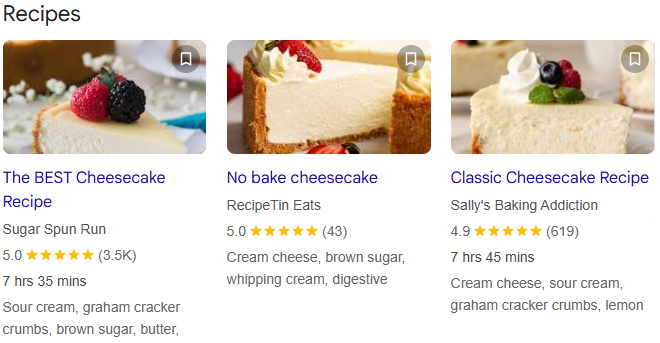
Why Recipe Schema Matters for Your Food Blog's SEO
If you run a food blog, recipe schema is the single highest-return SEO investment you can make. Here's why it matters across every dimension of search visibility in 2026:
1. Recipe Rich Results in Google Search
Google displays recipe-specific rich results — visual cards showing your recipe's image, star rating, cooking time, and calorie count — directly in search results for users who are looking for exactly what you've made. These rich results dramatically outperform plain blue links in click-through rate. A recipe card that shows four stars, 30 minutes, and 350 calories before a user even clicks is far more compelling than a plain URL.
2. Google Recipe Carousel and Filters
At the top of many recipe-related searches, Google shows a carousel of recipe cards pulled from structured data. Appearing in that carousel puts your recipe above organic results — in a position most bloggers never reach through content alone. Recipe schema also feeds Google's interactive filters, allowing users to narrow results by cook time, diet type, and ingredients. Without structured data, your recipe is invisible to those filters.
3. Google Discover Visibility
Google Discover surfaces content to users before they search — and it strongly favours pages with complete structured data and high-quality images declared in schema. A missing or low-resolution image property can disqualify your recipe from Discover entirely, costing you a significant passive traffic channel.
4. Voice Search and AI Assistants
When someone asks a voice assistant for a quick pasta recipe or a low-calorie dessert, the assistant pulls structured data from pages that explicitly declare that information in machine-readable format. Recipe schema with nutrition, suitableForDiet, and totalTime properties is precisely what makes your content answerable by voice and AI-powered search tools.
5. Indirect SEO Boost Through Higher CTR
While recipe schema doesn't directly change your ranking position, it improves how your listing looks in search results. A richer, more informative listing earns more clicks. More clicks send stronger engagement signals to Google, which over time supports better organic ranking. The SEO benefit is real — it's just indirect.
Recipe schema is how you teach Google not just that a page contains a recipe, but what that recipe is, why someone should click it, and who made it. Without it, your food blog competes blind.
What You Lose Without Recipe Schema
Skipping recipe structured data isn't a neutral choice — it's a measurable disadvantage against every food blog that has implemented it. Here's exactly what's at stake:
- No recipe rich results. Without valid
Recipeschema, Google won't display your recipe with star ratings, cook time, or a thumbnail in search results. Competitors with schema markup command significantly more attention in the same SERP. - Invisible to Google's recipe carousel. The recipe carousel at the top of recipe searches is entirely structured-data-driven. No schema, no carousel. It's a binary exclusion.
- Filter invisibility. Google's recipe search filters — by diet, cook time, and ingredients — only surface pages with the corresponding structured data properties. A gluten-free recipe without
suitableForDietin its schema never appears in the gluten-free filter. - Google Discover ineligibility. A missing or non-compliant
imageproperty in your schema removes your recipe from Discover placement entirely. - Voice and AI citation gaps. AI assistants and voice search prioritise structured, machine-readable content. Recipes without schema are harder for AI systems to cite, interpret, and recommend.
- Lost CTR to schema-equipped competitors. Every recipe that appears with a star rating and prep time in search results earns more clicks than one that doesn't. That gap compounds over time.
Many WordPress food blog themes claim to include recipe schema. In practice, the auto-generated markup is frequently incomplete, missing recommended properties like nutrition and aggregateRating, or using incorrect date formats. Always verify what your theme is actually outputting with Google's Rich Results Test.
Required Properties — What Google Needs
Google's structured data documentation for recipes distinguishes between properties that are required for rich result eligibility and those that are recommended. Start with the required set — without these, your recipe schema won't qualify for any rich results at all.
name— The name of the recipe. This is required and should match the visible recipe title on the page.image— One or more URLs pointing to images of the finished dish. Google strongly recommends providing images in all three aspect ratios: 1x1, 4x3, and 16x9, each with a minimum of 50,000 pixels total. This is required for rich results and Discover eligibility.author— The person or organisation who created the recipe. Include at minimum aname, and ideally aurllinking to the author's profile. Set@typeto eitherPersonorOrganization.description— A short summary of the dish. Required to give search engines and users meaningful context about the recipe before they click.recipeIngredient— An array of ingredient strings, each describing a single ingredient with its quantity. Required for recipe rich results.recipeInstructions— Step-by-step cooking instructions, ideally structured asHowToStepobjects — each with anameandtextproperty. This is what Google uses to display instructions in rich results. Do not include section headings like "Step 1" or "Directions" in the step text itself.
Recommended Properties — What Gets You Rich Results
Beyond the required minimum, Google's recipe documentation identifies a set of recommended properties that unlock richer SERP features — star ratings, nutrition panels, diet filters, and more. These are what separate a schema block that technically passes validation from one that actively wins clicks.
Timing Properties
Google displays prep time, cook time, and total time directly in recipe rich results. All timing values must use ISO 8601 duration format — for example, 20 minutes is PT20M and 1 hour 30 minutes is PT1H30M. The three properties are prepTime, cookTime, and totalTime.
Yield and Publication Date
recipeYield declares how many servings or units the recipe produces — for example, "8 servings" or "12 cookies". datePublished tells Google when the recipe was first published and is strongly recommended for content freshness signals. Use ISO 8601 format: 2026-05-14.
Category, Cuisine, and Diet
recipeCategory specifies the meal type — Dessert, Main Course, Appetizer, and so on. recipeCuisine declares the cuisine style — Italian, Indian, French. suitableForDiet is particularly powerful: it feeds Google's recipe filter system directly. Values must use schema.org's enumerated diet types — for example, https://schema.org/VeganDiet or https://schema.org/GlutenFreeDiet. Set this correctly and your recipe appears in filtered searches its competitors miss.
Nutrition Information
The nutrition property takes a NutritionInformation object. At minimum, include calories — Google displays calorie counts in recipe rich results. You can also include fatContent, carbohydrateContent, proteinContent, sugarContent, fiberContent, sodiumContent, and servingSize. The more complete your nutrition data, the more useful your rich result becomes to health-conscious searchers.
Aggregate Rating and Reviews
aggregateRating is what displays those star ratings in search results — and star ratings are one of the strongest CTR drivers available. Include ratingValue (the average score) and ratingCount (total number of ratings). For individual reviews, use the review property with Review objects. Note: only include aggregate ratings and reviews that reflect genuine user input — do not self-author fake ratings.
Video
Adding a video property with a VideoObject gives Google the data it needs to display your recipe video in rich results and video search. Include name, description, thumbnailUrl, uploadDate, duration, and either contentUrl or embedUrl.
Publisher and Page Metadata
publisher declares the organisation publishing the recipe — include name, url, and a logo as an ImageObject. mainEntityOfPage establishes the canonical URL of this recipe page as a WebPage entity. keywords lets you add comma-separated tags that describe the recipe. cookingMethod specifies the technique — Frying, Baking, Steaming, Grilling, and so on. dateModified tells Google when the recipe was last updated.
A schema block with only the six required properties will pass validation but won't unlock star ratings, nutrition panels, diet filters, or video results. Every recommended property you add opens an additional rich result feature. Completeness is what converts a technically valid block into a high-performing one.
Complete Recipe Schema Example
Here is a complete, Google-compliant recipe schema markup example in JSON-LD format, covering all required and key recommended properties. This is the kind of output you get from the Flawless Schema Recipe Schema Generator.
<script type="application/ld+json">
{
  "@context": "https://schema.org",
  "@type": "Recipe",

  "name": "Classic Margherita Pizza",
  "description": "A simple, authentic Margherita pizza with a thin crispy base, rich tomato sauce, fresh mozzarella, and fragrant basil leaves. Ready in under 40 minutes.",
  "keywords": "margherita pizza, homemade pizza, vegetarian pizza, Italian pizza recipe, thin crust pizza",

  "image": [
    "https://www.yoursite.com/images/margherita-pizza-1x1.jpg",
    "https://www.yoursite.com/images/margherita-pizza-4x3.jpg",
    "https://www.yoursite.com/images/margherita-pizza-16x9.jpg"
  ],

  "author": {
    "@type": "Person",
    "name": "Your Name",
    "url": "https://www.yoursite.com/about"
  },

  "datePublished": "2026-01-15",
  "dateModified": "2026-05-14",

  "prepTime": "PT15M",
  "cookTime": "PT12M",
  "totalTime": "PT27M",
  "cookingMethod": "Baking",
  "recipeYield": "2 servings",
  "recipeCategory": "Main Course",
  "recipeCuisine": "Italian",

  "suitableForDiet": [
    "https://schema.org/VegetarianDiet",
    "https://schema.org/LowFatDiet"
  ],

  "nutrition": {
    "@type": "NutritionInformation",
    "calories": "285 kcal",
    "fatContent": "9 g",
    "saturatedFatContent": "4 g",
    "carbohydrateContent": "38 g",
    "sugarContent": "3 g",
    "fiberContent": "2 g",
    "proteinContent": "12 g",
    "sodiumContent": "520 mg",
    "cholesterolContent": "20 mg",
    "servingSize": "1 slice (1/4 pizza)"
  },

  "recipeIngredient": [
    "250g pizza dough (store-bought or homemade)",
    "80ml passata or crushed tomatoes",
    "125g fresh mozzarella, torn",
    "1 tbsp extra virgin olive oil",
    "1 garlic clove, minced",
    "A handful of fresh basil leaves",
    "Salt and black pepper to taste"
  ],

  "recipeInstructions": [
    {
      "@type": "HowToStep",
      "name": "Preheat the oven",
      "text": "Preheat your oven to 250°C (480°F) or as high as it will go. Place a baking tray or pizza stone inside to heat up.",
      "image": "https://www.yoursite.com/images/step1-preheat.jpg",
      "url": "https://www.yoursite.com/recipes/margherita-pizza#step1"
    },
    {
      "@type": "HowToStep",
      "name": "Prepare the base",
      "text": "On a lightly floured surface, stretch or roll the dough into a thin round approximately 30cm in diameter.",
      "image": "https://www.yoursite.com/images/step2-dough.jpg",
      "url": "https://www.yoursite.com/recipes/margherita-pizza#step2"
    },
    {
      "@type": "HowToStep",
      "name": "Add the sauce",
      "text": "Mix the passata with minced garlic, a pinch of salt, and olive oil. Spread evenly over the base, leaving a 2cm border.",
      "image": "https://www.yoursite.com/images/step3-sauce.jpg",
      "url": "https://www.yoursite.com/recipes/margherita-pizza#step3"
    },
    {
      "@type": "HowToStep",
      "name": "Top with mozzarella",
      "text": "Scatter torn mozzarella pieces evenly over the sauce. Season with black pepper.",
      "image": "https://www.yoursite.com/images/step4-cheese.jpg",
      "url": "https://www.yoursite.com/recipes/margherita-pizza#step4"
    },
    {
      "@type": "HowToStep",
      "name": "Bake and finish",
      "text": "Transfer to the hot tray and bake for 10–12 minutes until the crust is golden and the cheese is bubbling. Remove from the oven, scatter fresh basil leaves on top, and serve immediately.",
      "image": "https://www.yoursite.com/images/step5-bake.jpg",
      "url": "https://www.yoursite.com/recipes/margherita-pizza#step5"
    }
  ],

  "video": {
    "@type": "VideoObject",
    "name": "How to Make Classic Margherita Pizza",
    "description": "Step-by-step video showing how to make an authentic Margherita pizza at home from scratch.",
    "thumbnailUrl": "https://www.yoursite.com/videos/margherita-pizza-thumb.jpg",
    "contentUrl": "https://www.yoursite.com/videos/margherita-pizza.mp4",
    "embedUrl": "https://www.youtube.com/embed/YOUR_VIDEO_ID",
    "uploadDate": "2026-01-15T10:00:00+00:00",
    "duration": "PT8M30S"
  },

  "aggregateRating": {
    "@type": "AggregateRating",
    "ratingValue": "4.8",
    "ratingCount": "312",
    "bestRating": "5",
    "worstRating": "1"
  },

  "review": [
    {
      "@type": "Review",
      "author": {
        "@type": "Person",
        "name": "Sarah K."
      },
      "reviewBody": "The simplest homemade pizza I have ever made. Crispy base, perfect sauce ratio — this is now our Friday night staple.",
      "datePublished": "2026-02-08",
      "reviewRating": {
        "@type": "Rating",
        "ratingValue": "5",
        "bestRating": "5",
        "worstRating": "1"
      }
    },
    {
      "@type": "Review",
      "author": {
        "@type": "Person",
        "name": "Marco R."
      },
      "reviewBody": "Authentic flavours with minimal effort. The fresh basil at the end makes all the difference.",
      "datePublished": "2026-03-21",
      "reviewRating": {
        "@type": "Rating",
        "ratingValue": "5",
        "bestRating": "5",
        "worstRating": "1"
      }
    }
  ],

  "publisher": {
    "@type": "Organization",
    "name": "Your Site Name",
    "url": "https://www.yoursite.com",
    "logo": {
      "@type": "ImageObject",
      "url": "https://www.yoursite.com/images/logo.png",
      "width": 250,
      "height": 60
    }
  },

  "mainEntityOfPage": {
    "@type": "WebPage",
    "@id": "https://www.yoursite.com/recipes/margherita-pizza"
  }
}
</script>
<!-- Powered by flawlessschema.com -->
How to Add Recipe Schema to a Food Blog
Adding recipe schema to any food blog or website follows the same core steps, regardless of the platform you're using.
Step 1: Generate Your Recipe Schema
Use the Flawless Schema Recipe Schema Generator to fill in your recipe details and generate a complete, valid JSON-LD block instantly. No coding knowledge required — you fill in the fields, the generator writes the markup.
Step 2: Copy the JSON-LD Script Block
Once you've filled in your recipe details, click Copy Code. You'll get a <script type="application/ld+json"> block that contains your complete recipe schema in JSON-LD format.
Step 3: Add It to Your Page
Paste the script block inside the <head> section of your recipe page's HTML, or just before the closing </body> tag. Both placements work correctly with Google's crawler. If you're using a CMS, most platforms give you a way to inject code into the page head — see the WordPress section below for specifics.
Step 4: Validate Your Markup
Run your page through Google's Rich Results Test to confirm your recipe schema is valid and eligible for rich results. Fix any errors; address warnings where possible. Then monitor your recipe's structured data performance in Google Search Console under Enhancements → Recipe.
Place one complete recipe schema block per page. Avoid duplicate or conflicting schema blocks — Google reads only one, and conflicting data can invalidate your markup silently.
How to Implement Recipe Schema on a WordPress Food Blog
WordPress is the most common platform for food blogs, and it gives you several paths to add recipe structured data. Here's how each approach works — and why generating your own JSON-LD gives you the most control.
Option 1: Manual Injection via a Code Plugin
This is the cleanest method and gives you full control over exactly what schema you're adding. Generate your recipe schema at flawlessschema.com/recipe-schema-generator, then use a plugin like Insert Headers and Footers or WPCode to inject your JSON-LD block into the <head> of the specific recipe page. Both plugins let you target individual pages so your schema appears only on the page it describes.
Option 2: Using Elementor or Divi's Custom Code Fields
If you build your food blog with a page builder like Elementor or Divi, both offer custom code or HTML blocks. Paste your generated JSON-LD into a Custom HTML widget or the page's custom head code field. This approach works well when you want schema tightly coupled to the page builder's layout.
Option 3: Via a Dedicated Recipe Schema WordPress Plugin
Several WordPress plugins generate recipe schema automatically when you enter your recipe details into a custom block or widget. While convenient, these plugins vary significantly in the completeness of the schema they produce. Many miss recommended properties like nutrition, suitableForDiet, and multi-image support — properties that directly affect rich result eligibility. If you use a plugin, verify what it actually outputs by running your page through the Rich Results Test.
Why a Standalone Generator Gives You an Edge
Using the Flawless Schema Recipe Schema Generator alongside any of the above methods means you always know exactly what your schema contains. You're not dependent on a plugin's interpretation of schema.org or Google's guidelines — you generate the markup yourself, to the full standard, and paste it in. It's the most reliable way to ensure your recipe structured data is complete and correct every time.
Generate Recipe Schema Free — No Coding Needed
The Flawless Schema Recipe Schema Generator is purpose-built for food bloggers, chefs, and SEO professionals who want complete, Google-compliant recipe markup without writing a single line of code. Here's what makes it the right tool for the job.
Every Required and Recommended Property, Covered
The generator covers the full set of recipe properties defined by schema.org and recommended by Google — not just the bare minimum. It includes fields for basic recipe info, timing (with automatic ISO 8601 conversion), yield, category, cuisine, diet types, nutrition facts, ingredients, step-by-step instructions, video, aggregate ratings, individual reviews, publisher details, and the page's canonical URL. Fill in what applies to your recipe, leave the rest blank, and the generator handles the rest.
- Basic info: Recipe name, description, keywords, author (Person or Organization), author URL, date published, date modified
- Multiple images: Supports multiple image URLs across all recommended aspect ratios (1x1, 4x3, 16x9)
- Timing: Prep time, cook time, total time — all auto-converted to ISO 8601 duration format
- Yield and method: Recipe yield and cooking method
- Category, cuisine and diet: Full dropdown support including all schema.org diet types (Vegan, Gluten-Free, Halal, Kosher, Low Calorie, and more)
- Nutrition: Calories, fat, carbohydrates, protein, sugar, fibre, sodium, cholesterol, serving size
- Ingredients and instructions: Dynamic field addition for any number of ingredients and HowToStep instructions
- Video: Full VideoObject support with upload date and duration
- Ratings and reviews: Aggregate rating and multiple individual reviews
- Publisher and page metadata: Publisher name, logo URL, and canonical page URL
Instant JSON-LD — Copy or Download
As you fill in the form, your JSON-LD code generates in real time in the output panel beside it. You can copy the complete schema block to your clipboard with one click, or download it as a JSON file for version control. No account required, no signup, no cost.
Google Rich Result Eligible Output
The generator follows Google's Search Essentials and structured data guidelines at every step. Every property it outputs is aligned with what Google's Rich Results Test expects to see. The generator also includes field-level validation — flagging missing required fields and formatting issues before you paste the code anywhere.
Optimised for Voice Search and AI
By covering structured properties like suitableForDiet, nutrition, totalTime, and recipeCategory, the generator ensures your recipe schema is machine-interpretable not just for Google's web crawler but for voice assistants and AI-powered search tools that draw on structured data to generate answers.
Enter your recipe details, get complete JSON-LD markup in seconds, and paste it into any website or WordPress blog. No account needed. Open the Recipe Schema Generator →
How to Validate Your Recipe Schema
Generating correct recipe schema is only half the work — you also need to confirm that Google can read it and that it qualifies for rich results. Here are the tools to use.
Google's Rich Results Test
Google's Rich Results Test is the primary validation tool for recipe schema. Paste your page URL or the raw JSON-LD code, and it shows you whether your markup is eligible for rich results, lists any errors that block eligibility, and lists warnings about missing recommended properties. Fix all errors. Address warnings wherever you can — each warning typically represents a rich result feature you're not unlocking.
Schema.org Validator
The Schema.org Validator checks your markup against the full schema.org specification — catching structural issues and type errors that the Rich Results Test may not surface. Run both for complete coverage.
Google Search Console
After your recipe page is indexed, monitor its structured data performance in Google Search Console → Enhancements → Recipe. This view shows you which pages have valid recipe schema, any errors or warnings across your site, and how those issues change over time. It's the long-term monitoring layer that keeps your recipe schema healthy as you publish new content.
The Flawless Schema Recipe Schema Generator performs field-level validation as you fill in the form — catching formatting issues with dates, times, and URLs before your schema reaches a validator. This means the code you copy is already clean, but running it through Google's Rich Results Test after pasting it into your page is always good practice.
Conclusion
Recipe schema is the difference between a food blog that Google displays richly — with star ratings, prep times, calorie counts, and images in search results — and one that shows up as a plain blue link competing on text alone. In a SERP where every recipe card that earned structured data is more compelling than yours, the gap matters.
The good news is that implementing recipe schema correctly is no longer a technical barrier. You don't need to write JSON-LD by hand, hire a developer, or rely on a WordPress plugin that may or may not cover every property Google recommends. The Flawless Schema Recipe Schema Generator covers every required and recommended property — from ingredients and instructions to nutrition, ratings, diet types, and video — and produces clean, Google-compliant JSON-LD in seconds.
Fill in your recipe details, copy the output, paste it into your page, and validate it with Google's Rich Results Test. That's the complete workflow — and it positions every recipe you publish to compete for rich results, recipe carousels, Google Discover, and voice search from the moment it goes live.
Your next recipe deserves to be seen. Generate your recipe schema free at flawlessschema.com →
Found this guide useful? Get more like it.
Schema tips, Google updates, and structured data strategies — delivered to your inbox. No spam, ever.
No spam · Unsubscribe any time · Privacy Policy